Hacking Smartphone
by Tech Rat
Smartphone is a soon to be released service available in some areas that will incorporate all the currently available services (Call Waiting, Three-Way Calling, Call Forwarding, Caller ID, etc.,) into one complete easy to use package, and combine that with a new type of phone that will access these services though an easy to use interface, which will also allow you to use custom services set up by third-party providers available through Smartphone only.
The Smartphone itself has no dial and no keypad. Instead, the device is about the size of a large office phone, having the hook and handset off to the side. The main unit consists only of a touch-sensitive LCD screen that contains the interface. It sort of looks like a large Sharp Wizard with a phone handset attached.
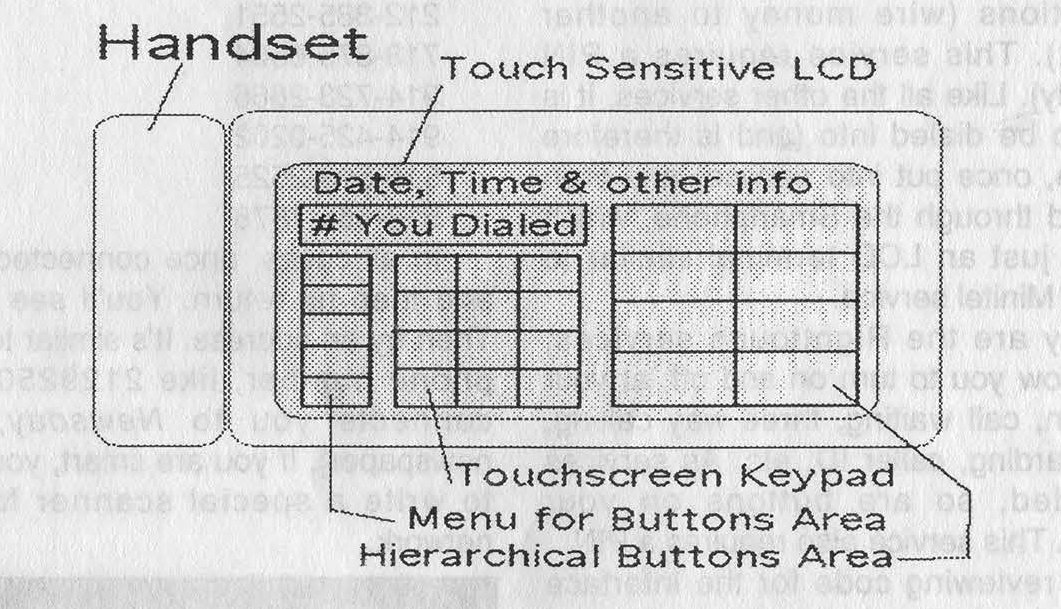
The computer that controls the Smartphone is a simple device, needing only a small 16-bit microprocessor and only about 128 kB of RAM. Upon startup, the phone reads the operating system from ROM, and then loads your phone book from battery backed RAM, similar to the way a Sharp Wizard works.
The interface is built around the concept of a hierarchical file system, similar to Windows or Macintosh, with a series of buttons on screen that lead you to other buttons down the menu structure. You can create and delete directory entries, and they are entered through an alphanumeric keypad displayed on the LCD. You can set up a hierarchical structure for organizing your numbers such as "Friends," "Contacts," "Relatives," and "Emergency."
Under each of these buttons on the menu tree is a listing of the names of people you have entered into the system for that button area. Touching a displayed name on a particular "button" automatically dials the entry. To those of you who work with similar "smart" systems, all of this will seem very academic.
However, what makes the Smartphone really smart is the number of services being created to take advantage of its LCD screen and computer interface.
The first service is the White Pages: Imagine being able to look up anyone by dialing into the RBOC computer through a packet switching network and local dial-in point and accessing it legally through Smartphone. Anyone listed in the White Pages is listed in this database stored by the RBOC computer. You can search by area code, prefix, name, address, etc... Any database type field is available here.
The next service is personal mailboxes: Here, you can retrieve voice messages, fax messages, email, etc... Voices are played back through your handset, faxes are printed to your screen and can be stored locally if they are short, and e-mail can be read, but currently not replied to, since the Smartphone lacks a keyboard that can be touch-typed on. This service also allows you to route your calls to another number you may be at at the time.
Next is something called MACH Services. This allows you to do all banking transactions (except deposits and withdrawals) through the Smartphone interface. In this mode, the LCD screen acts like a retarded ATM, except that it contains a few features not available on an ATM. They are: verify check, authorize credit card purchase, and checking transactions (wire money to another account). This service requires a PIN (obviously). Like all the other services, it is meant to be dialed into (and is therefore hackable, once put into service) and then accessed through the Smartphone, which is really just an LCD terminal similar to France's Minitel service.
Lastly are the RightTouch services, which allow you to turn on and off, at your discretion, Call Waiting, Three-Way Calling, Call Forwarding, Caller ID, etc. As services are added, so are buttons on your interface. This service also requires a PIN.
After reviewing code for the interface that is being built into the Smartphone, I can honestly say that anyone with half a brain will be able to build a Smartphone compatible interface for their PC and be able to also dial into these services and hack away. While there is nothing about the interface that is unique, its touch screen and buttons would make it difficult for anyone to emulate without a windowing and mouse compatible computer.
All of these services and Smartphone itself are being installed as part of ISDN services, and will be made available to consumers probably near the end of 1995. Basically, to access these services, the Smartphone dials a local number into the RBOC's packet switching network, then enters a code that corresponds to an address that connects to the service you wish to contact. While the dial-in number is always the same, it will be the addresses that vary, and it will be finding those addresses that will be the challenge of future hacking. As more services become available, you have the option of subscribing to them through the Smartphone, in which case the packet address of the service is added to your personal directory. Theoretically it should be possible to link a Smartphone with another Smartphone through the network to trade phone directories.
If you wish to try finding addresses within a packet switching network, here's the RBOC Pac-net for the New York metro area.
These numbers are the ones I know, but there are certainly others that you can find:
212-385-2551 718-875-6504 914-723-2666 914-425-0202 516-599-2525 516-665-7878 |
In all cases, once connected, type HH and then hit Return. You'll see a prompt. Then try an address. It's similar to a regular phone number, like 2129250054 (this connects you to Newsday, a local newspaper).
If you are smart, you'll be able to write a special scanner for such a network.